從模糊到銳利:GPU 升級帶來高畫質遊戲體驗
以下為官方發布原文照登(未改寫、未翻譯),來源連結見本頁。(原文語言:英文)
Are you still stuck in the pixelated past, squinting at blurry textures and dialing down settings just to keep your frame rate above single digits? You’re not alone. For too many gamers, the dream of experiencing modern titles in all their visual glory remains just that – a dream. But it doesn’t have to stay that way, and it doesn’t even require a complete gaming PC overhaul. With a strategic investment in one crucial component, you can break the 1080p ceiling and get a modern gaming experience.
An extreme PC makeover of this order is possible because in the ever-evolving world of PC gaming, the Graphics Processing Unit (GPU) reigns supreme. It’s the engine that renders every stunning landscape, every explosive effect, and every smooth animation. If you’re looking to improve gaming visuals and achieve a significant gaming PC performance boost, especially from a 1080p starting point, a GPU upgrade is the ultimate way to upgrade what matters gaming. This guide will walk you through how to transform your experience from merely playable to truly brilliant, focusing on the sweet spot for high-settings 1440p gaming.
Your GPU is the artist of your PC. While your CPU handles the game’s logic and physics, it’s the GPU that paints the picture on your screen. An older or underpowered GPU is like an artist with a dull brush, a small canvas, and a limited color selection. No matter how good the concept, the final artwork will lack detail and vibrancy.
Upgrading your GPU directly translates to:
If you’re currently stuck in 1080p gaming with low FPS, or you feel like you’ve never quite been able to break away from low settings gaming, a new GPU is your ticket to a much better experience.
For gamers chasing the most lifelike visuals, 4K gaming reigns supreme, but you can still get a huge upgrade over 1080p visuals without making the hardware investment necessary for 4K. 1440p (2560×1440) offers the best balance of visual fidelity and achievable frame rates for most gamers. It’s a significant step up from 1080p, providing noticeably sharper images without the extreme hardware demands of 4K.
Many modern mid-range GPUs deliver excellent performance at 1440p with high or even ultra settings. You actually have plenty of contenders for the best budget gaming GPU for this resolution. For a targeted mid-range gaming PC build, you’ve got options. Let’s look at some of the top contenders in the current market.
NVIDIA’s latest generation offers compelling options for gamers ready to make the leap. Two GPUs in particular get recommended quite frequently for gamers making the leap from 1080p to 1440p. First is the GeForce RTX 5060 Ti 8GB, which makes for a fantastic entry point thanks to high 1080p performance. In many titles, it’s game for 1440p with the right settings and a boost from DLSS. The RTX 5070 steps up the game for a truly premium 1440p experience.
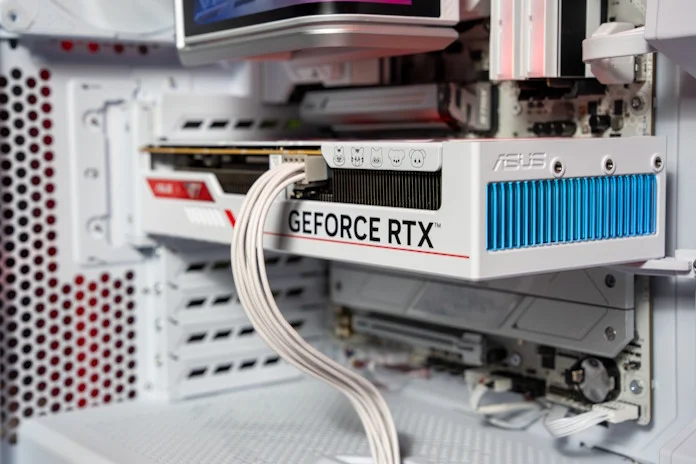
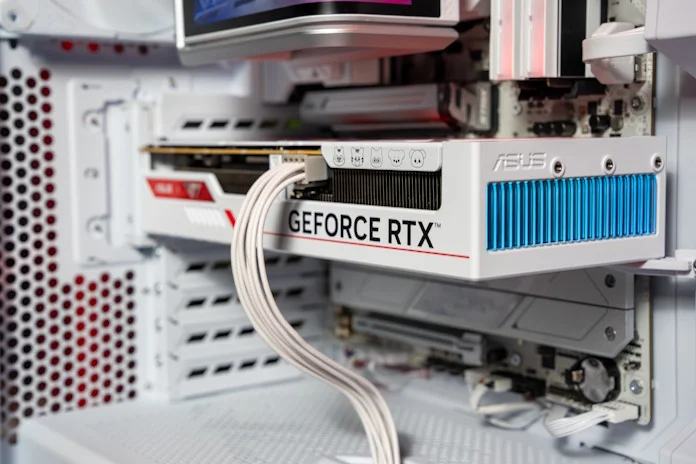
Of course, not all graphics cards are built the same, even those that use the same chips from NVIDIA. We think that the ASUS Dual GeForce RTX 5060 Ti 8GB makes the most sense for gamers looking for a cost-effective upgrade. It’s one of the most affordable RTX 5060 Ti 8GB options on the market, but perhaps more importantly it’s also one of the most compact. Whether you’re upgrading an older prebuilt PC, building a small-form factor gaming rig, or simply looking for a graphics card that won’t interfere with your PC’s drive cage, this card is a great fit.
Stepping up to the RTX 5070 involves a boost in power draw, more VRAM, and higher GPU clocks, so we’ll recommend stepping up to a graphics card with beefier cooling. The TUF Gaming GeForce RTX 5070 fits that bill nicely. Its triple-fan cooling solution features a vented exoskeleton and a phase-change GPU thermal pad, giving it the thermal headroom to shrug off heat with ease. A key part of upgrading to the RTX 5070 is its 12GB pool of GDDR7. That additional margin makes it better able to keep pace with the increasing demands of modern games, letting you experience 1440p gaming without compromise.
AMD’s Radeon RX 9000 series also brings formidable options to the table, offering competitive performance and excellent value. The Radeon RX 9060 XT is a strong performer for high 1080p and capable 1440p gaming, and is available in two VRAM configurations.
If you’re looking at the Radeon RX 9060 XT 8GB vs the Radeon RX 9060 XT 16GB, the big difference is right there in the name. The starter option offers 8GB of GDDR6, whereas the other steps up to 16GB of GDDR6. For competitive play, 8GB is just fine. The 16GB model stands out when you start looking at AAA gaming at 1440p. If you’re a variety gamer who’s inclined to grab a new AAA game fairly regularly, the Radeon RX 9060 XT 16GB is the smarter long-term choice.
Once again, you have plenty of options for picking up one of these cards. The ASUS lineup includes the compact and affordable Dual Radeon RX 9060 XT 8GB , which is one of your best choices for building a gaming PC on a tight budget. The Prime Radeon RX 9060 XT 8GB and Prime Radeon RX 9060 XT 16GB step up their game with a triple-fan cooling solution that keeps things slim and trim with a 2.5-slot cooler. If you have the elbow room in your build for a larger cooling solution (and most gamers these days do) the TUF Gaming Radeon RX 9060 XT 16GB will put that space to good work with its thicker heatsink.
No single component matters more for gaming than your GPU, but a truly successful upgrade considers your whole system. Before installing your new graphics card, ensure your existing power supply (PSU) has enough wattage and the correct connectors to handle the increased demands.
It’s also worth noting that while this article focuses on the GPU, an older CPU can sometimes bottleneck even a powerful new graphics card, a topic we cover in more depth here. Additionally, a more powerful GPU generates more heat, so verify your PC case has adequate airflow. Finally, a modern motherboard provides the necessary PCIe slot (preferably PCIe 4.0 or 5.0 for optimal performance) and stable power delivery for your new GPU. ASUS motherboards, for instance, are renowned for their robust build quality and compatibility, offering a stable foundation for any gaming PC performance boost.
Upgrading your GPU is arguably the most exciting and impactful change you can make to your gaming PC. It’s the direct path from blurry to brilliant, unlocking the high-settings gaming experience you’ve been craving. Whether you choose an NVIDIA RTX 5060 Ti or 5070, or an AMD Radeon RX 9060 XT 8GB or 16GB, you’re investing in a future of stunning visuals and smooth frame rates.
Don’t let your old GPU hold you back from enjoying the latest titles as they were meant to be played. It’s time to upgrade what matters and truly immerse yourself in your favorite virtual worlds.
規格
- 支援解析度
- 1080p
- 遊戲設定
- 高設定
來源連結
規格與發布資訊引用自官方來源;本文評析為本站原創。
全新 ASUS GPU 卡,不僅能將您的遊戲體驗提升到新的層次,還能在高解析度下保持卓越的影像質量。
事實上,此卡支援 1080p 解析度下的高設定遊戲,並且可以提升至更高解析度下依然保持銳利的影像和流暢的遊戲性。
誠實來說,雖然具體規格未在宣傳材料中明確提到,但我們相信這款 GPU 卡將為遊戲愛好者帶來無窮的樂趣和驚喜。
優點
- 影像質量卓越
- 適用於多種遊戲
討論區