Logitech 如何設計一款可摺疊的掌上滑鼠 Mobi Fold
以下為官方發布原文照登(未改寫、未翻譯),來源連結見本頁。(原文語言:英文)
This week, Logitech announced Mobi Fold, our first ultra-portable, foldable mouse. When designing something that reimagines mobile productivity, there’s a lot to consider. How do you build productivity, comfort, and style into something that fits into your pocket? To understand the design process behind the fold, we spoke to Tae Kim and Oscar Garcia on the Mobi Fold design team.
“The best tool is the one you have” is a powerful guiding quote. How did this philosophy specifically shape the early sketches and prototypes of the Mobi Fold?
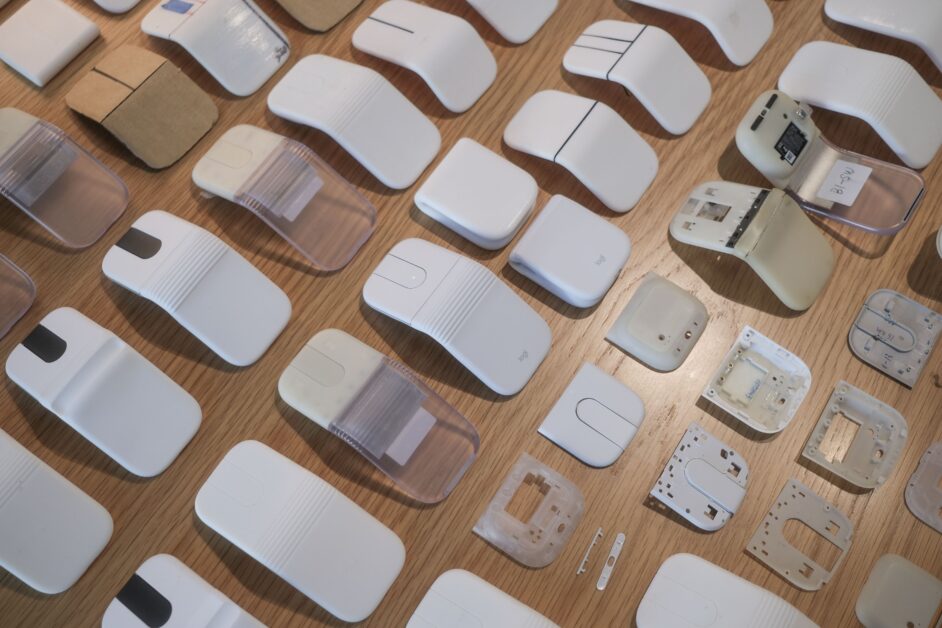
Even the best tools provide zero value if they’re left behind because they’re too bulky to carry. Our earliest ideas didn’t actually look like traditional mice; instead, we looked at everyday objects that people do not leave behind. This shaped our early sketches and prototypes to focus on size and pocketable silhouettes, ensuring the Mobi Fold could seamlessly integrate into the ecosystem of things you already carry with you every day.
A traditional mouse becomes uncomfortable if it’s too small. What was the “eureka” moment when the team realized folding was the definitive solution to the portability-versus-comfort dilemma?
From the beginning, we saw that making a mouse smaller would limit usability. Realizing we couldn’t just shrink a traditional mouse down opened our minds to broader ideas—we started exploring concepts that could transform or change shape. However, transforming shapes adds complexity; the transition between working and storing had to be intuitive and frictionless.
Our “eureka” moment came from a rough side-view sketch showing the mouse unfolded as “ON” and folded as “OFF”. We realized that if the physical transformation itself directly tied the ergonomic setup to the power state, the interaction would feel completely natural. That simple sketch proved folding was the elegant, definitive solution we were looking for.
The mouse folds down to the size of a Post-it note. How difficult was it to pack all the necessary tracking and clicking technology into that specific, ultra-compact footprint?
As a team, we set a very specific folded-size target. Achieving it required an intense, cross-functional effort to fit all essentials into a compact space without sacrificing performance or design.
Normally, when you design a mouse, you have plenty of vertical depth to play with. You can stack components right on top of each other. To hit our size target, everyone needed to continuously redesign and figure out ways to make parts and aspects of the mouse smaller and more efficient.
The mouse is tested to fold for up to 15 years of use. Can you take us inside the durability testing labs, what did that stress-testing process look like?
Our engineering team does an amazing job finding new ways to test the limits of our products. Every detail, from folding to buttons, drops, and ports, undergoes extensive testing.
One new test I learned about during this project was the tumbling test. In this test, the mouse is placed inside a machine with everyday objects it might be stored alongside, like keys, a phone, or other commonly found items in a bag or pocket. The machine then spins like a dryer to simulate the repeated impacts and motions the mouse experiences in real life. This helps us understand areas of improvement.
The interaction is designed to feel natural: opening it creates a hand rest and powers it on, while closing it powers it off. How did you ensure this unconventional mechanism felt intuitive from the very first try?
We wanted the user experience to be completely friction-free. If a user had to unfold the mouse and then fumble around for a tiny power switch, the magic of the form factor would be lost. When you fold it to put it away, it powers off. By tying the power state directly to the form factor, the mouse anticipates your needs—it’s ready to work the exact second it takes shape.
Aside from the folding mechanism, what was the single biggest unexpected challenge the engineering or design team faced during development, and how did you overcome it?
I would say form and size—ironically, because at Logi, designing mice isn’t something we aren’t familiar with. Designing a mouse that changes its geometry was a new set of challenges to solve.
As Logitech’s first ultra-portable, foldable mouse, did the team feel a unique pressure to set a new standard for mobile productivity?
Definitely, and it came in waves. At the start, there were the technical challenges, but the pressure didn’t truly hit until we began testing and sharing the first rounds of functioning prototypes. Once you hold it in your hands, you begin to realize how small and disruptive it truly is. Internally, there was an immense amount of interest and excitement around Mobi. Everyone wanted to see it, touch it, and try it. That internal buzz provided us with a ton of brilliant, constructive feedback.
Please enter your username or email address to reset your password.
© 2024 Logitech - Logitech Blog Logitech .
規格
- 尺寸
- 摺疊後僅為 Post-it 登錄檔大小
- 功能
- 超輕便、摺疊設計
- 材料
- 未明確列出
- 續航時間
- 未明確列出
- 連線方式
- 無線
來源連結
規格與發布資訊引用自官方來源;本文評析為本站原創。
在設計一款可摺疊的滑鼠時,Logitech 因何決定從常見物品中尋找靈感?團隊成員 Tae Kim 和 Oscar Garcia 分享了 Mobi Fold 起草和原型設計早期階段的故事。
Mobi Fold 為何能夠既小巧又舒適?團隊如何通過摺疊設計解決了便攜性和舒適性之間的難題。
雖然 Mobi Fold 折疊後僅為 Post-it 登錄檔大小,但其內部技術是否也經過精心設計?開發團隊分享了在極小空間內整合所有必要功能的挑戰。
優點
- 便攜性極強,易於攜帶
- 摺疊設計提升使用體驗
- 整合日常隨身物品的尺寸理念
缺點
- 內部技術整合挑戰大
- 未明確列出
- 可能需要特別注意維護和清理
討論區