How I Created a Smart Home Solution Using the Logitech MX Creative Console
Official announcement republished verbatim (not rewritten or translated); source linked on this page.(Original language:English)
As someone passionate about smart home technologies, I saw an opportunity to fill a unique gap. While smart homes have grown increasingly popular, there’s still room for improvement in how users interact with them. Imagine sitting at your desk in your work-from-home setup. Your smart lights are on, but you want to adjust them to focus, dim them for relaxation, or toggle appliances. You could use a web interface, but that means opening a browser and disrupting your workflow. The Creative Console felt like a natural alternative. The console is an intuitive tactile control surface for fine-tuned adjustments, and using it is simpler and faster than browser-based interfaces.
Why Home Assistant Powers This Integration
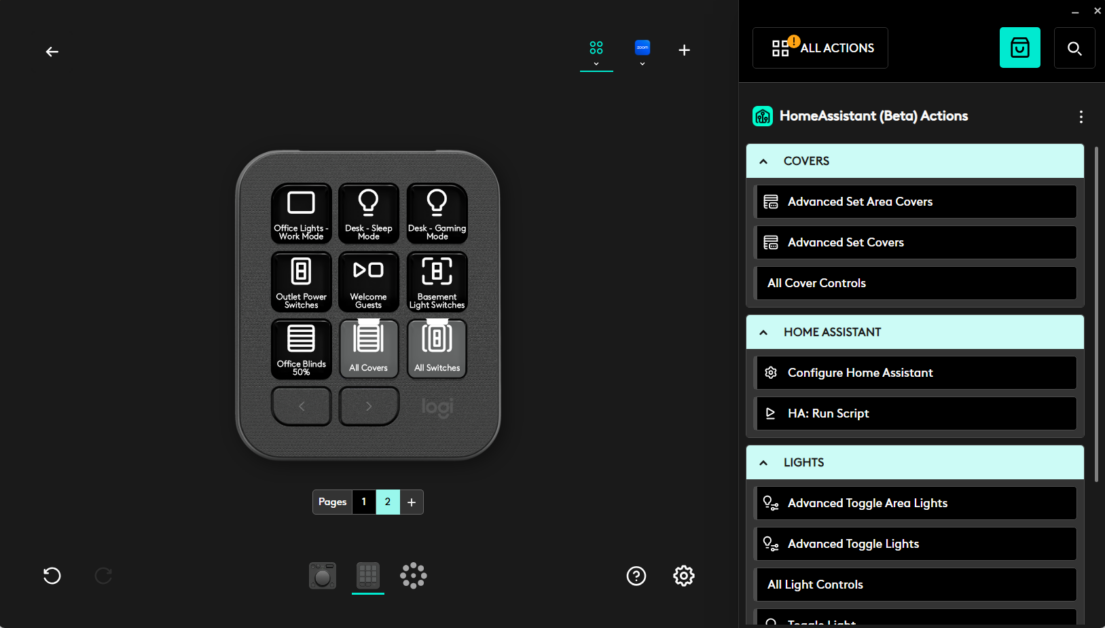
Home Assistant’s modularity allowed me to explore how Logitech’s MX Creative Console could be adapted to seamlessly control smart home devices such as lights. With the infrastructure provided by Logitech’s Logi Actions Software Development Kit (SDK), I developed a plugin that integrates functionality directly into the Options+ ecosystem. For my project, the SDK served as the bridge between the MX Creative Console and the smart home plugin login. Instead of building a control interface from scratch, the SDK handled key elements such as reading inputs from the console, managing actions, and integrating with the Options+ ecosystem. This allowed me to focus on designing the smart home behaviors themselves. It also ensured that the plugin would feel native to the Logitech experience, offering users a polished and consistent interface.
The Solution: An Options+ Plugin
This Home Assistant plugin focuses on controlling smart lights, and its potential extends far beyond lighting in the near future. For now, here’s how it works:
Logitech and Open-Source: Strengthening Community Connections
We were proud to launch the plugin as open-source under the MIT License. Open-source tools empower users to tweak, expand, and personalize the technology to meet their needs, fostering collaboration and innovation.
The Logi Actions SDK is designed to be open and invites developers to build plugins like mine. By making this plugin open-source, we hope to inspire open-source developers to explore ways to integrate products into their homes and workflows.
For anyone interested in exploring the beta plugin in detail, the full project page, including documentation, installation instructions, and source code, is available on GitHub
While my personal project focused on smart lights, I am next looking at adding support for smart switches and covers , enabling even greater versatility. As a community designer, I’m excited about the possibilities that lie ahead. From integrating additional smart devices, such as thermostats and door locks, to enabling more sophisticated multi‑device configurations, there is still so much untapped potential in connecting peripherals with smart home environments. I’m optimistic about what the Creative Console can achieve for both my personal use and users around the world.
A How-To Guide along with the beta plugin page can be found here [ link ]
Our legal department made us say this next part: this software is not distributed by Logitech, it is a personal project by Cristian Safta and Logitech makes no representations or warranties regarding the project.
Please enter your username or email address to reset your password.
© 2024 Logitech - Logitech Blog Logitech .
Specifications
- Control Interface
- MX Creative Console
- Platform Support
- Logi Actions SDK, Home Assistant
- Open-Source
- MIT License
- Feature Scope
- Smart Lighting
Sources
Specs and launch info are cited from official sources; the analysis is our own original writing.
The MX Creative Console offers a new level of control, allowing users to make fine-tuned adjustments without disrupting their workflow. For instance, whether you're working from home and want to adjust the lighting for better focus or relaxation, you can do so quickly without opening a browser.
Home Assistant’s modularity allowed me to explore how the Logitech MX Creative Console could be adapted to seamlessly control smart home devices. Using the Logi Actions Software Development Kit (SDK), I developed a plugin that integrated functionality directly into the Options+ ecosystem. The SDK enabled me to focus on designing smart home behaviors while ensuring a native and polished interface for users.
I released the Home Assistant plugin as open-source, hoping to inspire other developers to explore integrating products into their homes and workflows. For those interested, more details can be found on the full project page available on GitHub, including documentation, installation instructions, and source code.
Pros
- Simplified workflow
- Strong integration capabilities
Cons
- Limited initial features
Discussion