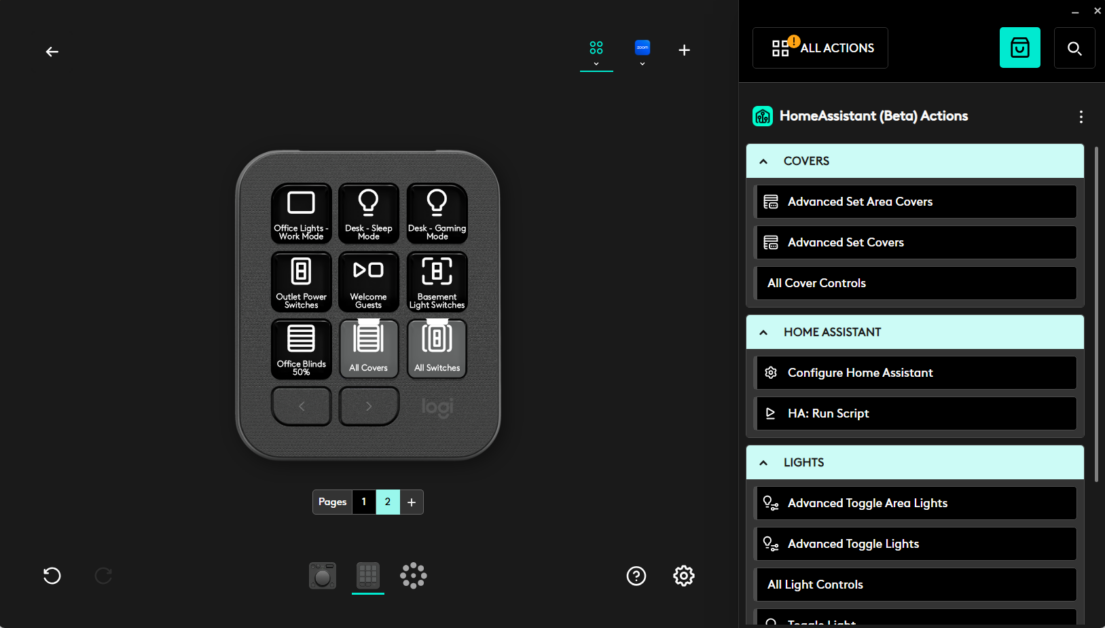
如何使用Logitech MX Creative Console打造智慧家居解決方案
以下為官方發布原文照登(未改寫、未翻譯),來源連結見本頁。(原文語言:英文)
As someone passionate about smart home technologies, I saw an opportunity to fill a unique gap. While smart homes have grown increasingly popular, there’s still room for improvement in how users interact with them. Imagine sitting at your desk in your work-from-home setup. Your smart lights are on, but you want to adjust them to focus, dim them for relaxation, or toggle appliances. You could use a web interface, but that means opening a browser and disrupting your workflow. The Creative Console felt like a natural alternative. The console is an intuitive tactile control surface for fine-tuned adjustments, and using it is simpler and faster than browser-based interfaces.
Why Home Assistant Powers This Integration
Home Assistant’s modularity allowed me to explore how Logitech’s MX Creative Console could be adapted to seamlessly control smart home devices such as lights. With the infrastructure provided by Logitech’s Logi Actions Software Development Kit (SDK), I developed a plugin that integrates functionality directly into the Options+ ecosystem. For my project, the SDK served as the bridge between the MX Creative Console and the smart home plugin login. Instead of building a control interface from scratch, the SDK handled key elements such as reading inputs from the console, managing actions, and integrating with the Options+ ecosystem. This allowed me to focus on designing the smart home behaviors themselves. It also ensured that the plugin would feel native to the Logitech experience, offering users a polished and consistent interface.
The Solution: An Options+ Plugin
This Home Assistant plugin focuses on controlling smart lights, and its potential extends far beyond lighting in the near future. For now, here’s how it works:
Logitech and Open-Source: Strengthening Community Connections
We were proud to launch the plugin as open-source under the MIT License. Open-source tools empower users to tweak, expand, and personalize the technology to meet their needs, fostering collaboration and innovation.
The Logi Actions SDK is designed to be open and invites developers to build plugins like mine. By making this plugin open-source, we hope to inspire open-source developers to explore ways to integrate products into their homes and workflows.
For anyone interested in exploring the beta plugin in detail, the full project page, including documentation, installation instructions, and source code, is available on GitHub
While my personal project focused on smart lights, I am next looking at adding support for smart switches and covers , enabling even greater versatility. As a community designer, I’m excited about the possibilities that lie ahead. From integrating additional smart devices, such as thermostats and door locks, to enabling more sophisticated multi‑device configurations, there is still so much untapped potential in connecting peripherals with smart home environments. I’m optimistic about what the Creative Console can achieve for both my personal use and users around the world.
A How-To Guide along with the beta plugin page can be found here [ link ]
Our legal department made us say this next part: this software is not distributed by Logitech, it is a personal project by Cristian Safta and Logitech makes no representations or warranties regarding the project.
Please enter your username or email address to reset your password.
© 2024 Logitech - Logitech Blog Logitech .
規格
- 控制介面
- MX Creative Console
- 平臺支援
- Logi Actions SDK, Home Assistant
- 開放原始碼
- MIT License
- 功能範圍
- Smart Lighting
來源連結
規格與發布資訊引用自官方來源;本文評析為本站原創。
MX Creative Console提供了全新的操控體驗,使得使用者能夠更快速地調整家居裝置而不受打擾。例如,在家中工作時,您可以使用此控制台來調節燈光亮度,無論是為了提高注意力還是放鬆心情,都不需要開啟瀏覽器。
Home Assistant 的可模組性讓我能夠探索如何利用 Logitech MX Creative Console 來無縫控制智慧家居裝置。藉助 Logi Actions 軟體開發套件 (SDK),我開發了一個外掛,直接整合到 Options+ 生態系統中。通過 SDK,我可以專注於設計智慧家居行為本身,同時確保該外掛具有與 Logitech 體驗一致的介面。
我將這個 Home Assistant 外掛開放原始碼,希望能夠鼓勵更多開發者探索整合產品到他們的家和工作流程中。對於感興趣的人士,可以在 GitHub 上找到完整的專案頁面,包括文件、安裝說明和原始碼。
優點
- 簡化操作流程
- 整合性強
缺點
- 初期功能有限
討論區