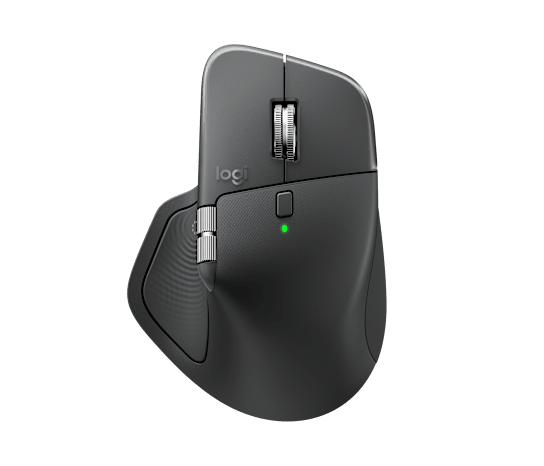
Logitech MX Master 4: Haptic Feedback and an Actions Ring Arrive on the Flagship Productivity Mouse
Official announcement republished verbatim (not rewritten or translated); source linked on this page.(Original language:English)
Buy MX Master 4 and Save up to $100 on select Ecosystem Products. Shop Now.
Free standard shipping (3-5 business days) on orders of $29 and above.
Free returns within 30 days of your purchase.
Meet the MX Master 4 that brings immersive control and precision you can feel with customizable haptic feedback on specific actions. Save up to 33% of your time with Actions Ring shortcuts and MX Master 4, by accessing tools and filters at your cursor. Additional features: 2x better connectivity, ultra fast scrolling with the MagSpeed scroll wheel, 8k DPI any surface tracking, including glass & Logi Options+ for customization.
*Logitech Ergo Lab study (2025) with 37 MX Master mouse users tested across 8 desktop actions. Results may vary depending on assigned shortcuts.
Immerse yourself with the Haptic Sense Panel
*Requires Logi Options+ app, available for Windows and macOS at app.logi.com
Save up to 33% of your time with Actions Ring shortcuts*
*Logitech Ergo Lab study (2025) with 37 MX Master mouse users tested across 8 desktop actions. Results may vary depending on assigned shortcuts.
Feel precision with native haptics on Windows 11
*Compatible with the latest version of the Windows OS (Windows 11 update from the end of March 2026 onwards)
The first productivity mouse to offer native integration with Advanced Haptics on Windows 11
The first productivity mouse to offer native integration with Advanced Haptics on Windows 11
We engineer our products for speed, precision, and high performance, all while considering sustainability as a key criterion throughout every stage of the product development process
Plastic should have more than one life
High tech, lower impact batteries
It's not just what's in the box
Logitech, Logi, their logos, and all other Logitech trademarks are trademarks or registered trademarks of Logitech Europe S.A. and/or its affiliates in the U.S. and other countries. All other third party trademarks are the property of their respective owners. See all trademarks
Look out for a welcome offer in your inbox.
Specifications
- New interaction
- Customizable haptic feedback (first time)
- Shortcuts
- Actions Ring radial quick-menu
- Connection
- ~2x stronger connection (per Logitech)
- Surface
- Micro-textured stain-resistant surface
- Multi-device
- MX-flagship multi-device switching
- Announced / On sale
- Announced 2025-09-30 · on sale 2025-10
- Price (official)
- US$120; per Logitech's regional sites
Sources
Specs and launch info are cited from official sources; the analysis is our own original writing.
The Logitech MX Master 4 is live on Logitech's official site. The opinions and analysis here are our own; specs are cited from Logitech's official product page (see sources below).
Key features: the MX Master 4 is the MX-line flagship mouse, and this generation adds customizable haptic feedback for the first time (subtle vibration cues during actions), plus a new Actions Ring — a summonable radial quick-menu for triggering common actions (copy, paste, app switching) faster. Logitech cites a ~2x stronger connection vs. the prior gen and a micro-textured stain-resistant surface, while keeping MX hallmarks like multi-device switching and cross-computer control. Announced Sept 30, 2025, on sale in October, at a US$120 price.
Our take: the MX Master line has been near-synonymous with "productivity mouse" for years, and the fourth-gen strategy is clear — don't redesign the ergonomics (already excellent), but add new software-hardware interactions. The haptic feedback is the most interesting attempt: it turns the "did that click register?" uncertainty into a tactile confirmation, a plus for people leaning on macros and shortcuts. The Actions Ring extends the Logi Options+ ecosystem, making shortcuts more intuitive to summon. Steadier connection and a stain-resistant surface are small upgrades long-time users will appreciate. To be fair on trade-offs: US$120 is not cheap for a mouse; whether haptics and the Actions Ring truly fit your workflow depends heavily on habit — done poorly they're just "cool features." And for satisfied MX Master 3S owners, the shape and basic feel are similar, so upgrade necessity is debatable. In short: for heavy multitaskers who live on shortcuts and multi-device switching, it remains the go-to flagship; if you just want a well-shaped wireless mouse, far cheaper models will do.
An honest note: haptic feedback and the Actions Ring generally rely on the Logitech Options+ software and supported apps to shine. Pricing, colors and availability follow Logitech's regional sites.
Pros
- First-time haptic feedback gives clear tactile confirmation
- Actions Ring quick-menu speeds up common actions
- Steadier connection, stain-resistant surface and multi-device switching
Cons
- US$120 is not cheap for a mouse
- New features' value depends heavily on Options+ software and habits
- For MX Master 3S owners, basic feel is largely unchanged
Discussion