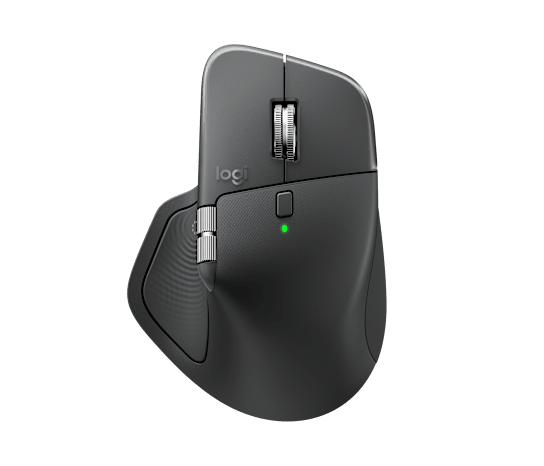
Logitech MX Master 4 專題:首度加入觸覺回饋 + Actions Ring,旗艦生產力滑鼠再進化
以下為官方發布原文照登(未改寫、未翻譯),來源連結見本頁。(原文語言:英文)
Buy MX Master 4 and Save up to $100 on select Ecosystem Products. Shop Now.
Free standard shipping (3-5 business days) on orders of $29 and above.
Free returns within 30 days of your purchase.
Meet the MX Master 4 that brings immersive control and precision you can feel with customizable haptic feedback on specific actions. Save up to 33% of your time with Actions Ring shortcuts and MX Master 4, by accessing tools and filters at your cursor. Additional features: 2x better connectivity, ultra fast scrolling with the MagSpeed scroll wheel, 8k DPI any surface tracking, including glass & Logi Options+ for customization.
*Logitech Ergo Lab study (2025) with 37 MX Master mouse users tested across 8 desktop actions. Results may vary depending on assigned shortcuts.
Immerse yourself with the Haptic Sense Panel
*Requires Logi Options+ app, available for Windows and macOS at app.logi.com
Save up to 33% of your time with Actions Ring shortcuts*
*Logitech Ergo Lab study (2025) with 37 MX Master mouse users tested across 8 desktop actions. Results may vary depending on assigned shortcuts.
Feel precision with native haptics on Windows 11
*Compatible with the latest version of the Windows OS (Windows 11 update from the end of March 2026 onwards)
The first productivity mouse to offer native integration with Advanced Haptics on Windows 11
The first productivity mouse to offer native integration with Advanced Haptics on Windows 11
We engineer our products for speed, precision, and high performance, all while considering sustainability as a key criterion throughout every stage of the product development process
Plastic should have more than one life
High tech, lower impact batteries
It's not just what's in the box
Logitech, Logi, their logos, and all other Logitech trademarks are trademarks or registered trademarks of Logitech Europe S.A. and/or its affiliates in the U.S. and other countries. All other third party trademarks are the property of their respective owners. See all trademarks
Look out for a welcome offer in your inbox.
規格
- 新互動
- 首度可自訂觸覺回饋
- 快捷
- Actions Ring 數位環快捷選單
- 連線
- 官方稱連線強度提升約 2 倍
- 表面
- 微紋理抗汙處理
- 多裝置
- MX 系旗艦多裝置切換
- 發表 / 上市
- 2025-09-30 發表 · 2025-10 上市
- 售價(官方)
- US$120,各區以 Logitech 官網為準
來源連結
規格與發布資訊引用自官方來源;本文評析為本站原創。
Logitech MX Master 4 已於 Logitech 官方網站上架。本文觀點與評析為本站原創,規格引用自 Logitech 官方產品頁(見文末來源)。
重點配置:MX Master 4 是 MX 系列旗艦滑鼠,這代首度加入可自訂的「觸覺回饋」(操作時透過震動給予提示),並新增 Actions Ring 數位環——一個可叫出的環形快捷選單,讓常用動作(複製、貼上、切換應用等)更快觸發。官方標示連線強度較前代提升約 2 倍,表面改採微紋理抗汙處理;延續多裝置切換、跨電腦操作等 MX 招牌功能。發表於 2025 年 9 月 30 日、10 月上市,官方價 US$120。
我們的看法:MX Master 系列多年來幾乎是「生產力滑鼠」的代名詞,第四代的策略很明確——不重新設計人體工學(因為它本來就好用),而是補上軟硬整合的新互動。觸覺回饋是這代最有意思的嘗試:它把「按了沒按到」的不確定,變成手感上的明確回應,對搭配巨集、快捷操作的人有加分;Actions Ring 則延續 Logi Options+ 軟體生態,把快捷叫出來更直覺。連線更穩、表面抗汙都是長期使用者會有感的小升級。代價要持平說:US$120 對一支滑鼠不便宜;觸覺回饋與 Actions Ring 是否真能融入你的工作流,相當看個人習慣,弄不好就只是「酷功能」;而且對已有 MX Master 3S 且滿意的人,外型與基本手感差異不大,升級必要性見仁見智。簡單說:重度多工、靠快捷與多裝置切換吃飯的人,它依然是首選旗艦;但若你只是要一支好握的無線滑鼠,便宜很多的型號也能勝任。
誠實補充:觸覺回饋與 Actions Ring 多需搭配 Logitech Options+ 軟體與支援的應用才能發揮;各地售價、配色與上市時間以 Logitech 各區官網公告為準。
優點
- 首度觸覺回饋,操作有明確手感回應
- Actions Ring 快捷選單,常用動作更快
- 連線更穩 + 抗汙表面 + 多裝置切換,旗艦體驗
缺點
- US$120 對一支滑鼠不便宜
- 新功能效益高度依賴 Options+ 軟體與個人習慣
- 對 MX Master 3S 使用者,基本手感差異不大
討論區